

Why a Property Calculator Should Sometimes Say "N/A"
A BRRR refinance that returns more cash than you put in should be great news. The naive way to calculate the return on that turns it into a nonsense number instead.
The problem
Run a BRRR refinance where the money that comes back out is more than the cash you originally put in, and most return calculations quietly break. Return on capital is normally cash left in the deal, expressed as a percentage. When the cash left in goes negative, dividing by a negative number flips the sign — and a calculator that isn’t watching for it will happily hand you a plausible-looking percentage that means nothing at all. A genuinely good outcome can end up displayed as if it were a loss, or an unremarkable deal can accidentally look spectacular. Either way, it’s wrong, and it looks exactly like a real number.
The same shape of problem shows up on the HMO side: when the mortgage plus investor funding covers more than the property actually cost, “buyer cash required” goes negative too, and a naive ROI calculation divides by that negative figure the same way.
What normal calculators do
Most just run the formula. If the denominator happens to be negative, the formula doesn’t know that, and it doesn’t tell you. You get a number. It has a percent sign after it. Nothing about it looks broken.
What I decided
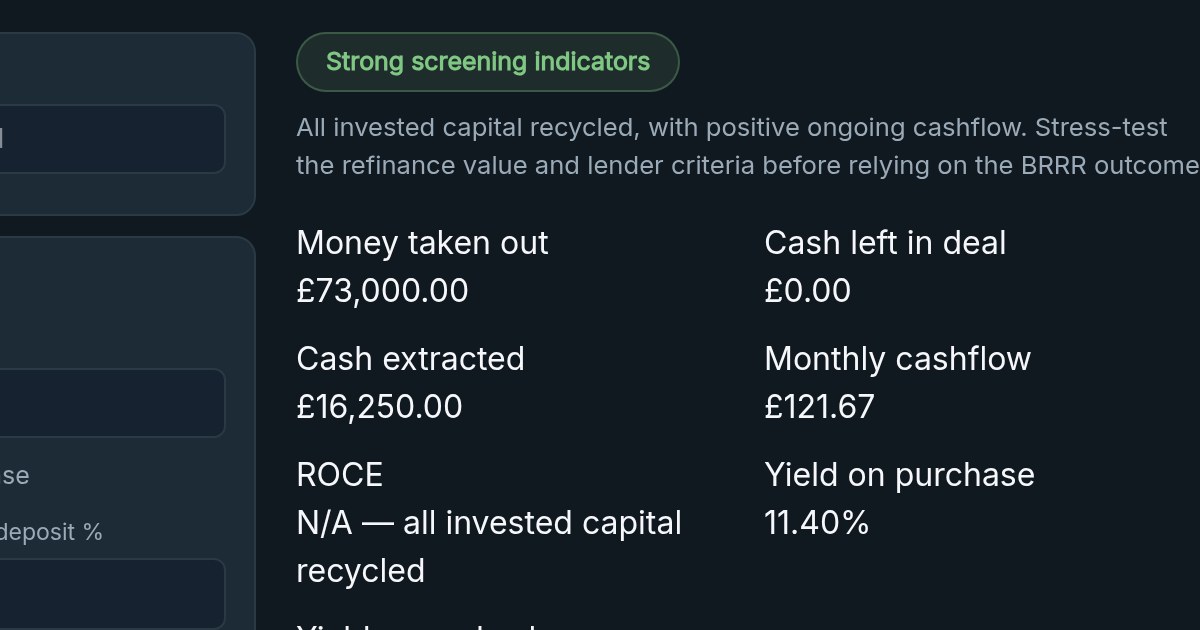
When the capital-basis denominator goes negative, Deal Analyser doesn’t compute a return on it at all. It floors the figure at zero, reports the excess as its own explicit metric — Cash extracted on the BRRR side, Funding surplus on the HMO side — and shows N/A instead of a fabricated percentage. On the stress-test panel, the same rule applies: a scenario that pushes the same denominator to zero also reads N/A, not a bare 0.00% that looks like a real answer.
The point isn’t that this is a clever piece of maths. It’s the opposite — it’s refusing to give a seductive, precise-looking number when that number would be economically meaningless. A tool that always gives you an answer is easier to trust than one that sometimes tells you the honest answer doesn’t exist yet. Only one of those is actually trustworthy.
What this looks like in practice
Run a BRRR that fully recycles your capital with positive cashflow through Deal Analyser, and you’ll see N/A — all invested capital recycled next to your ROCE, with the actual amount extracted shown separately — not a distorted negative percentage that reads like a warning sign for what was actually a strong result.
Full build detail and the other decisions behind the calculator are on the Deal Analyser project page.
Free Deal Analyser
Run the numbers before you fall in love with the deal.
Use the free Deal Analyser to test BTL, BRRR, HMO and business acquisition scenarios — cashflow, yield, SDLT, DSCR and stress checks, all in one place.
Open Deal Analyser