

SAKO Cinema: A Jellyfin Theme Built for Family Movie Night
Why a dad rebuilt the look of the family Jellyfin server around movie night, what CSS can and can't change, and why the theme installs from release tags only.
Updated 19 October 2026
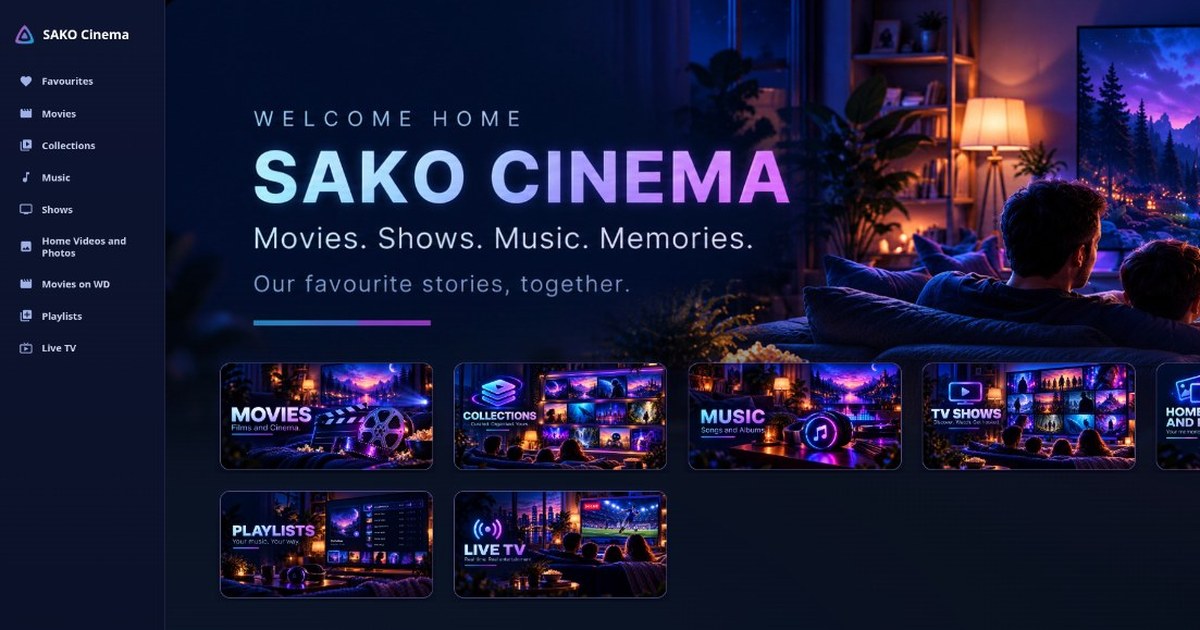
Why I bothered
During the day everyone in our house is on their own screen. The kids have their games, I have my work, and the devices that are supposed to connect us mostly do the opposite. Family movie night is the one time a screen does the reverse. Everyone ends up on the same sofa, looking at the same picture, arguing about the same choice.
I take that evening seriously enough to have automated it. I wrote a small script that sends a message to the kids’ computers before the film starts: save your game, family movie time is coming. It’s a silly little thing, and it’s also the most honest description of what I value. I don’t want the film to start with someone still stuck in a menu upstairs.
Our films, series, music and home videos live on a home server and play through Jellyfin. Owning the library matters to me. Nothing disappears because a licence ran out, nobody has to work out which subscription a film is on this month, and the home videos sit next to the cartoons instead of in a separate app nobody opens. Jellyfin does all of this well. What it doesn’t do is look like movie night. Out of the box it looks like what it is: a media server with an admin panel attached. Grey lists, small text, a page that feels like you’ve wandered into the settings.
That matters more than it sounds. Choosing the film is part of the evening. For the kids it’s half the fun. They browse with their eyes, not by title, and they pick what looks exciting. The home screen is the front door of the evening, and I wanted it to feel like walking into our living room after dark: deep blue, a warm lamp, the glow of the TV, something on the table to share. So I built a theme for it and called it SAKO Cinema.
A few principles came from being a parent rather than a designer.
The banner is not us. The hero image shows a family on a sofa watching a film, but it’s an illustration, not a photo of my family. Our own photos and videos stay private in their own library. The theme is something I’m happy to publish, and that only works if nothing in it is personal.
The rules stay on the server. There is a library in our Jellyfin the kids shouldn’t see, and the family account simply doesn’t have access to it. A theme could hide a tile, but hiding something with CSS is decoration, not protection. Who sees what is decided by Jellyfin user permissions, and the theme never touches them.
The TV comes first. Movie night happens on the big screen with a remote, not on my desktop. Anything that would make the TV harder to use with a D-pad, just to make a monitor look nicer, was out.
What it is
Two stylesheets and a set of artwork. theme.css handles colours, cards and pages: dark navy, electric blue, violet and magenta, a gradient Play button, detail pages that show the film’s backdrop through a navy scrim, rounded cards with a soft glow on hover. layout.css is optional and changes the structure: a left sidebar on wide screens, a full-width hero banner, library tiles laid over it, and one card style shared by Continue Watching, Next Up and Recently Added.
It’s built on ElegantFin, pinned to a tested release, rather than written from scratch. ElegantFin already solves a lot of the hard, boring problems of styling Jellyfin, and there’s no reason to solve them twice.
There are also nine matching covers for typical libraries: Movies, TV Shows, Music, Collections, Home Videos & Photos, Live TV, Playlists and a few more. They’re meant to be set as each library’s real Primary image in Jellyfin, not painted on with CSS, for a reason that comes straight from the living room (below).
Installing it is one paste into Dashboard → Branding → Custom CSS, followed by Ctrl+Shift+R. The banner text is yours to change. This is exactly what my own server uses:
@import url("https://cdn.jsdelivr.net/gh/Sako404/SAKO-Cinema-Theme@v1.2.0/theme.css");
@import url("https://cdn.jsdelivr.net/gh/Sako404/SAKO-Cinema-Theme@v1.2.0/layout.css");
:root {
  --sako-hero-kicker: "Welcome home";
  --sako-hero-title: "SAKO Cinema";
  --sako-hero-subtitle: "Movies · Shows · Music · Memories";
  --sako-hero-tagline: "Our favourite stories, together.";
}
The second import is the optional layout. Leave it out and you keep Jellyfin’s normal structure with the SAKO colours and cards. The four --sako-hero- lines are optional too; an empty value hides a line. Put your own family’s name in the title. CSS can’t read the Jellyfin server name, so the repository also has a small optional script, set-hero-title.py, that reads the name from your server and writes the title line for you.
CSS is a skin, not a new app
The design started from a mock-up with a persistent sidebar, Netflix-style. Jellyfin Web has a top navigation bar. Custom CSS can restyle what Jellyfin renders, but it can’t add things Jellyfin doesn’t render, so the sidebar in layout.css is Jellyfin’s own library navigation, moved and restyled. The entries, their order and their names still come from Jellyfin.
That constraint shaped where the layout switches on. The sidebar only appears from 1100px wide, never in Jellyfin’s TV layout and never in the video player, and only in browsers that support CSS :has(). Phones and tablets keep the normal menu, and anything a remote control depends on stays stock.
The bigger limit is that native TV apps ignore Custom CSS entirely. On the box under our TV, Jellyfin looks like Jellyfin whatever the web client does. That’s why the library covers are uploaded as real Primary images: they’re stored on the server, so every client shows them, including the TV app that never loads a stylesheet. The kids still see the same covers on the big screen as on a laptop. Early versions overrode images in CSS, and that has a second cost: a background shorthand with !important on the card container is enough to quietly erase the real library images underneath.
The banner title works the other way round. The first version had “SAKO CINEMA” painted into the image, which meant anyone installing the theme got our name on their home screen. Since 1.2.0 the image is text-free and the title, the lines around it and the accent bar are drawn by CSS, sized as fractions of the banner so they scale with it. On a phone only the title is shown.
Small bugs that weren’t small
Most of the work after the first release candidate was polish, and a few fixes are worth naming because the symptoms looked nothing like the cause.
Detail-page backdrops had vanished, not because anything hid them, but because the page body had an opaque background painted over them. Making it transparent again and adding a navy scrim brought them back.
Posters disappeared whenever the mouse hovered over them, in every grid. Jellyfin 12 puts an overlay link over each card, and that link inherited the card’s opaque background, so on hover it covered the poster it was meant to sit on.
Section headings on the home page were aligned perfectly on my 2560px monitor and nowhere else. They now follow Jellyfin’s own 3.3% section indent at every width.
Release tags only, never a branch
This one changed how the project is released. At first the Custom CSS pointed at the theme through jsDelivr without a version, which follows the main branch, so every merge would reach the live server automatically. After one merge, jsDelivr kept serving the previous commit, even after a cache purge: layout.css returned a 404 and theme.css was the old file. Worse, @main served one browser a theme file months out of date while another location got the current one. jsDelivr resolves branch names per edge server and caches the answer, and a purge doesn’t reliably refresh it.
Tags and full commit hashes don’t have that problem. They’re immutable, and every edge serves the same file. So the rule now is simple: every release is a merged pull request, an annotated tag and a GitHub Release, and the install lines always name a tag. Updating means changing the version number in two lines. That’s a little less convenient, and it’s also the point. Auto-following main meant every merge went straight to the screen the family watches on, untested. Nobody wants to debug CSS while everyone waits on the sofa.
Limits, stated plainly
- The login page keeps Jellyfin’s base styling.
- Recently Added shows films as portrait posters. Jellyfin chooses the image type and CSS can’t change it.
- Native TV apps ignore Custom CSS. They get the library covers, not the theme.
- Tested in desktop Chrome and on phones. Firefox, Safari and Jellyfin Media Player haven’t been tested yet; without
:has()support the sidebar stays off and the standard top bar is used. - CSS is not a security boundary. Who sees which library is decided by Jellyfin user permissions, and the theme doesn’t touch them.
Where to get it
The code, artwork and install notes are on GitHub under the MIT licence. ElegantFin remains a separate project under its own licence. If you run Jellyfin for your own family and try it, I’d like to hear what breaks, especially on the browsers and clients I haven’t tested. And if it makes choosing tonight’s film a bit more fun, that was the whole idea.